Welcome to exdata’s documentation!
Exdata is a Python package for exporting data to Excel (xlsx) files with a focus on flexibility, customization, and ease of use. It provides a rich set of features for creating complex Excel documents with precise control over layout and formatting. Built on top of xlsxwriter, it leverages its robust Excel file generation capabilities while providing a more intuitive and flexible interface for complex document structures.
Features
Flexible Data Structure: Create complex layouts using nested rows and columns
Rich Text Formatting: Support for formatted text with different styles within a single cell
Customizable Layout: Control cell sizes, positions, and expansion behavior
Memory Efficient: Support for both in-memory and file-based operations
Example
Here’s a quick example of what you can do with exdata:
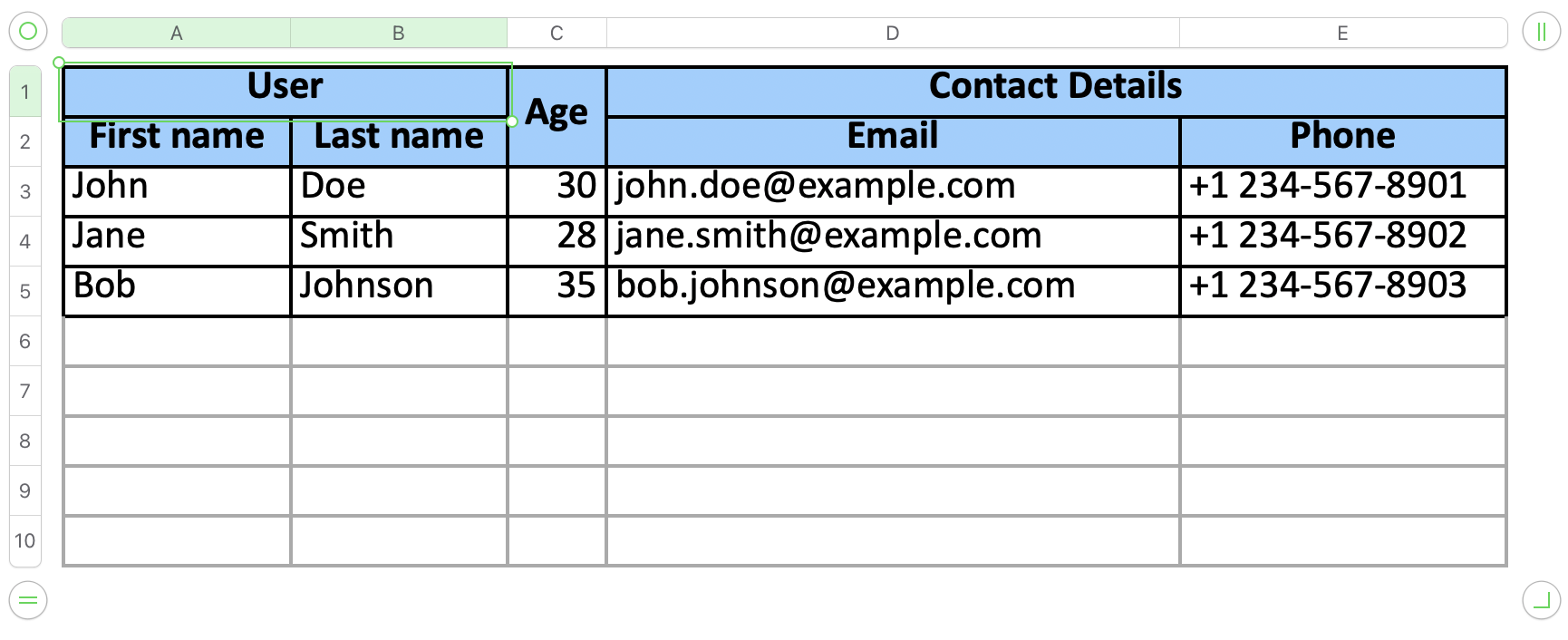
from exdata import XlsxExporter, Sheet, Row, Cell, Column

formats = {
    'default': {
        'border': 1,
        'align': 'vcenter',
    },
    'header': {
        'border': 1,
        'align': 'center',
        'valign': 'vcenter',
        'bg_color': '#98D0FF',
        'bold': True,
    },
}
sheet = Sheet(
    name='Example',
    data=[
        Row(
            data=[
                Column([
                    Cell('User'),
                    Row([
                        Cell('First name'),
                        Cell('Last name'),
                    ]),
                ]),
                Cell('Age'),
                Column([
                    Cell('Contact Details'),
                    Row([
                        Cell('Email'),
                        Cell('Phone'),
                    ]),
                ]),
            ],
            format='header',
        ),
        Row(data=[
            Cell('John'),
            Cell('Doe'),
            Cell(30),
            Cell('john.doe@example.com'),
            Cell('+1 234-567-8901'),
        ]),
        Row(data=[
            Cell('Jane'),
            Cell('Smith'),
            Cell(28),
            Cell('jane.smith@example.com'),
            Cell('+1 234-567-8902'),
        ]),
        Row(data=[
            Cell('Bob'),
            Cell('Johnson'),
            Cell(35),
            Cell('bob.johnson@example.com'),
            Cell('+1 234-567-8903'),
        ]),
    ],
    format='default',
)


exporter = XlsxExporter(sheets=[sheet], formats=formats)

with open('data_grid_example.xlsx', 'wb') as f:
    f.write(exporter.export().read())